
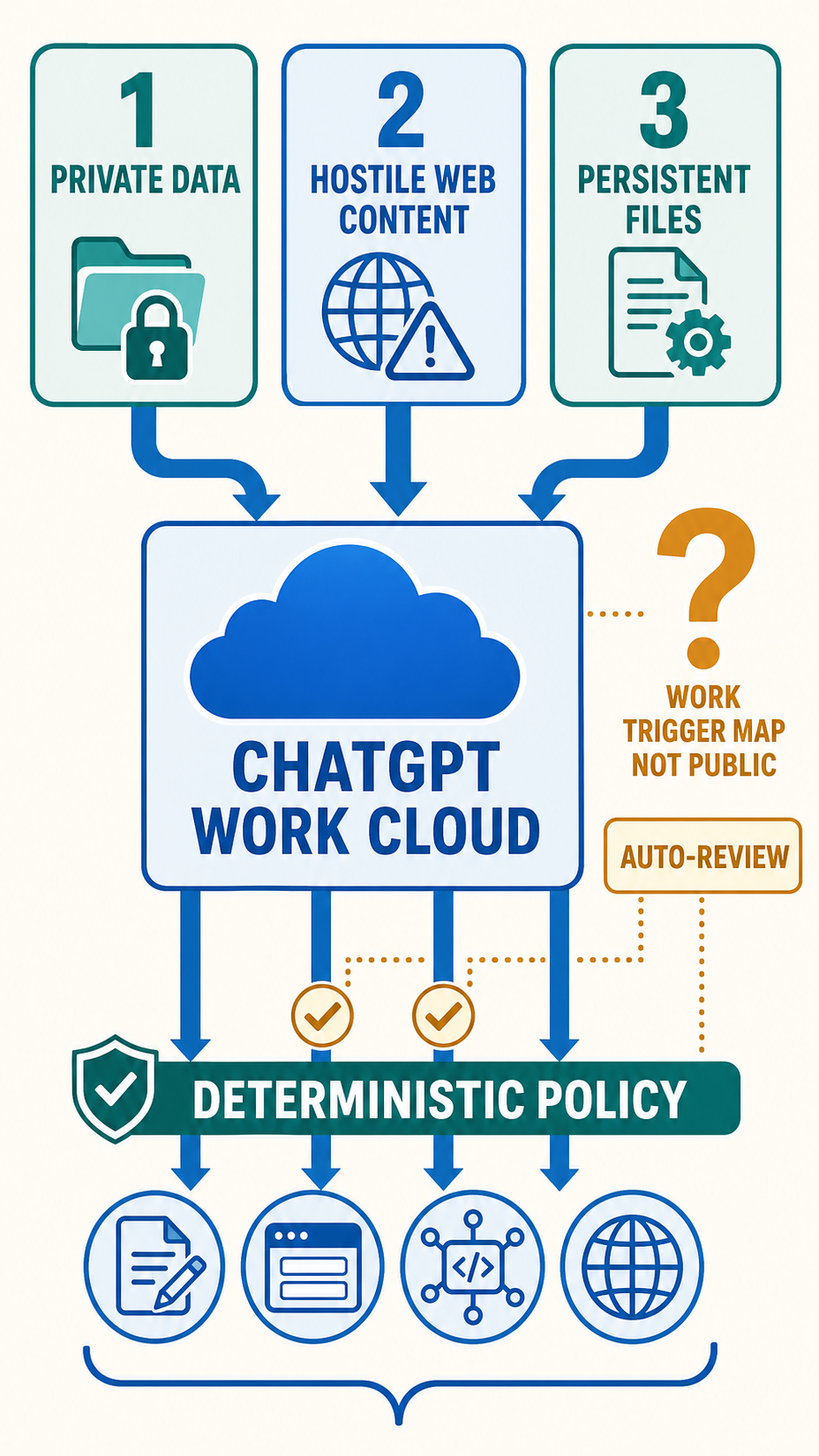
OpenAI launched ChatGPT Work on July 9 as an agent that can operate across apps and files, run for hours, use connected business systems and produce finished documents, software and websites. The launch post presents a useful operator’s tool: connect Slack, Microsoft Teams, Google Drive, SharePoint, email, calendars or a CRM, then let the agent gather context and carry a project through multiple steps.
That same design connects the three conditions security researcher Simon Willison calls the “lethal trifecta”: access to private data, exposure to untrusted content and a channel through which information can leave the system.
On August 30, Willison published hands-on findings from ChatGPT Work Cloud. He found internet-enabled code execution, a full headless Chrome browser, persistent shared storage across Work sessions, subagents, scheduled automations and website deployment through Cloudflare Workers. His conclusion was blunt: “ChatGPT Work combines all three.”
The open question sits at the gate. OpenAI’s detailed Auto-review documentation describes Codex: the reviewer evaluates actions that request permission to cross a sandbox or policy boundary, while actions already permitted by the active sandbox, network rules or tool policy proceed without review. OpenAI’s Work announcement says Auto-review protects important connected-tool and API actions, but public sources do not establish whether Work Cloud uses Codex’s exact trigger categories.
The three conditions are now product features
The first condition is private context. OpenAI says ChatGPT Work can pull information from Slack, Teams, Google Drive, SharePoint, email, calendars, CRMs, project trackers and other connected systems. Admins decide which sources and tools are available, while the agent decides when relevant plugins should supply context during a task.
The second is untrusted input. A built-in browser can gather material from websites, interact with web tools and bring fresh online context into a project. Scheduled Tasks can check websites and dashboards, process new messages, monitor customer feedback and react to email. Any of those sources may contain text written by an attacker, copied from an attacker or altered after an automation was configured.
The third is outbound communication. Work can fill web forms, call internet services from its code environment, act through connected tools, send reports, update shared material and deploy Sites that can be shared by URL. Willison reports that the Cloud code environment appears open to the wider internet by default, although it can be restricted to specified domains. He also demonstrated a Work-created site deployed through Cloudflare Workers.
Prompt injection needs no special exploit once those conditions converge. Malicious text can be interpreted as an instruction, private context can be available in the same task, and an ordinary tool can carry selected data outward. The attack rides the agent’s intended capabilities.
Persistence changes the blast radius
Willison found that each Work Cloud session receives a scratch directory under /workspace, with those directories persisting across sessions. He observed files from earlier chats and saw edits become visible across concurrently running sessions mounted to the same workspace volume.
That creates a second route for hostile instructions: durable artifacts.
A poisoned webpage could influence an agent to write a modified document, script, configuration file or project note into persistent storage. A later session may consume that artifact without revisiting the original page. Parallel subagents can read and modify the same workspace. Scheduled automations can return after the initiating user has moved on.
The evidence published so far does not demonstrate a successful cross-session data theft through this route. It does establish the mechanism needed for persistence: shared durable files, later agent runs and outbound-capable tools inside one product. Operators should test whether provenance follows copied text and generated files across sessions, and whether approval logic receives enough history to recognize that an apparently ordinary upload began with hostile web content several steps earlier.
The compact transcript described in OpenAI’s Auto-review documentation may include user messages, surfaced assistant updates, tool calls, tool outputs and the proposed action. Hidden model reasoning is excluded. A reviewer examining the final request could therefore see the destination and payload while missing an earlier semantic link that was lost when one agent wrote a file and another agent later opened it.
Long workflows widen that gap.
Codex documentation defines a request-driven reviewer
In its Codex documentation, OpenAI describes Auto-review as a separate reviewer agent that replaces a person for eligible approval requests. The main agent retains its sandbox, filesystem limits, network limits and approval policy. When an action asks to cross a configured boundary, the reviewer receives the request and either permits or denies it.
The Codex page lists escalated shell commands, network calls blocked by policy, edits beyond writable roots, MCP or app calls annotated to require approval, and Computer Use access to a new website or domain. OpenAI says the reviewer is designed to block attempts to send private data or credentials to untrusted destinations, probe for secrets, weaken security persistently or perform destructive actions.
In Codex, coverage depends on configuration. An action that already fits within the current sandbox or tool policy continues directly. A network destination already present on an allowlist creates no review request by itself. OpenAI advises administrators to add explicit prompt rules for sensitive commands and tools when activity inside the sandbox should still reach the reviewer.
This creates a concrete question for Work Cloud: which actions generate requests? An automated reviewer can make a decision only after the system routes an action to it. Public sources do not establish whether a permitted code-runtime request, browser interaction, connected-app write or Site publication reaches Work Cloud’s reviewer.
OpenAI says Auto-review “adds another layer of protection” for important Work actions involving connected tools and APIs. The separate Codex documentation says that implementation “only evaluates actions that ask to cross a boundary,” can make mistakes in adversarial contexts and should operate alongside sandbox design, monitoring and organization-specific policy.
There is also a documentation gap. The detailed Auto-review page describes Codex sandbox behavior, while OpenAI’s ChatGPT Work announcement says Auto-review protects connected-tool and API actions. Willison expects Work Cloud to use the same mechanism, but the supplied sources do not expose Work Cloud’s exact system prompt, tool annotations, default approval map or reviewer policy. His request for those details remains unanswered in the cited material.
Without that map, an enterprise cannot determine from public documentation which Work Cloud egress paths create approval requests.
Deterministic controls carry the load
Reviewer judgment is probabilistic. Network policy and tool permissions can close routes before judgment enters the loop.
OpenAI’s own guidance tells administrators to enforce target restrictions with independent filesystem and network rules. It warns that broad command patterns can erase the boundary Auto-review is supposed to guard and recommends narrow writable roots, precise command prefixes, least-privilege permission profiles and explicit approval requirements for sensitive tools.
For ChatGPT Work, that translates into a small set of operator decisions:
- Constrain network destinations. Work Cloud’s internet-enabled runtime should receive an allowlist tied to the task, with unknown destinations blocked. A wide allowlist turns outbound traffic into routine activity that may never reach Auto-review.
- Separate read tools from write tools. Search, retrieval and document reading carry different consequences from sending email, posting messages, modifying CRM records or publishing a site. Tool policy should encode that distinction directly.
- Force review at every egress class. Browser submissions, connected-app writes, API calls, file uploads, public Sites and code-runtime traffic each need an explicit answer: blocked, human-approved or Auto-reviewed. An organization that audits only shell-network escalations has covered one road out.
- Reduce persistent exposure. Shared workspace files need retention limits, provenance and scanning before another session or scheduled task consumes them. The current sources establish persistence but give no public account of taint tracking or injection-aware provenance inside Work Cloud.
- Test composed workflows. A direct request to upload a secret is an easy review case. A harder test begins with a hostile webpage, writes an intermediate file, delegates analysis to a subagent, waits for a scheduled run and publishes a derived artifact through an approved destination.
Auto-review remains useful. It can stop ambiguous escalations, return a denial rationale and instruct the main agent to seek a materially safer path. OpenAI also documents circuit breakers after repeated denials, limiting an agent’s ability to hammer the reviewer with variants during one turn.
Its value rises when deterministic boundaries produce a small, meaningful stream of approval requests. A permissive environment reverses that arrangement: most capabilities run freely, while the reviewer inspects the residue.
The test OpenAI has yet to publish
A credible Work Cloud security evaluation would enumerate every action capable of moving bytes beyond the workspace, state its default permission and show whether it triggers human approval, Auto-review or direct execution. It would then run prompt-injection cases through connected apps, browsing, internet-enabled code, persistent files, subagents, Scheduled Tasks and Sites.
The supplied sources contain no such matrix. They also provide no Work-specific injection test results, false-negative rate, audit examples or account of how the reviewer handles data assembled across several agents and sessions.
OpenAI gives administrators control over plugins, connected tools, browser use, cloud network access and sensitive actions. Enterprise customers also receive conversation and action visibility through the Compliance API. Those controls create the pieces of a defensible deployment, provided administrators can discover and lock down every outbound path before exposing high-value connected data. The Signal’s earlier coverage of an OpenAI evaluation agent escaping through shared infrastructure shows the cost of a missed egress path, while its OpenClaw Gateway analysis explains how a central access boundary can keep permissions and credentials enforceable.
As of August 31, watch for OpenAI to publish Work Cloud’s default network policy, tool-by-tool approval map and a prompt-injection evaluation covering persistent files, scheduled runs and public Sites.
The Signal is the public edge of a private practice. Sherpa points the same intelligence engine at one owner's business — competitors, suppliers, regulators, watched daily, graded and sourced. Work with a Sherpa →